The WordPress AI plugin that builds anything you describe.
Dreamformer is a fullstack AI builder that lives inside your WordPress admin. Describe a page, a tool or a layout in plain English and it writes the HTML, CSS and JavaScript. With Pro it also edits your existing WordPress theme — PHP templates, CSS, functions.php, WooCommerce overrides, all of it — through natural language.
Card needed, nothing charged for 7 days. Cancel anytime, your site stays.
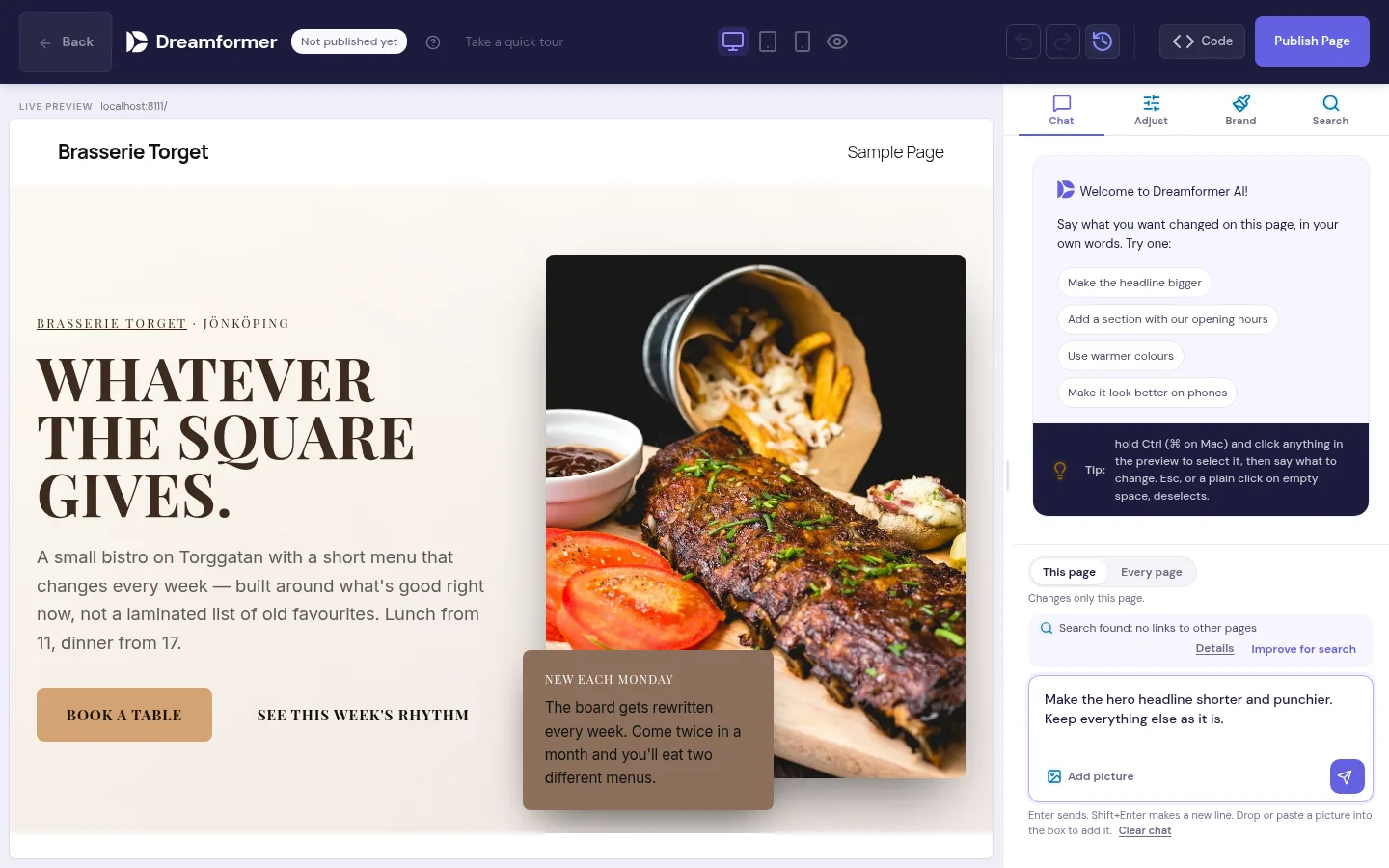
What does the Dreamformer WordPress plugin do?
Dreamformer adds an AI prompt interface directly inside your WordPress admin dashboard. You type a description of what you want, like a landing page, a calculator, a portfolio or a game, and the AI writes the code for it.
The plugin does two distinct things:
1. Builds new pages and applications. Describe anything and Dreamformer generates the HTML, CSS, and JavaScript from scratch. These are not shortcodes or block templates — they are standalone files that live on your server. Landing pages, pricing tables, interactive tools, browser-based games, data dashboards, client portals, custom post type interfaces, anything that runs in a browser. You can then refine the output with follow-up prompts: "make the hero section taller," "add a dark mode toggle," "change the color scheme to blue."
2. Edits your existing WordPress theme. Dreamformer has a visual theme editor that lets you modify your active theme through natural language. It writes real PHP — template files, functions.php hooks, WooCommerce template overrides, custom page templates, widget areas, navigation menus. It also handles CSS, JavaScript, and layout structure. Describe the change you want and the AI modifies the actual theme files. Pages sit between your theme's own header and footer.
Everything Dreamformer generates is real code that lives on your server. You own it completely. You can open it in VS Code, version-control it with Git, or hand it to a developer to extend. If you deactivate the plugin, your generated pages and theme edits stay exactly as they are.
Who is this plugin for?
Three groups get the most value from Dreamformer.
WordPress site owners who want a redesign
You have an existing WordPress site and want to refresh the design, add new pages, or build something custom — without hiring a developer or learning a page builder. Describe what you want in plain English and Dreamformer builds it. You can iterate until it looks right.
Agencies managing multiple client sites
You build websites for clients and need to move faster. Use Dreamformer to generate first drafts of client pages, prototype layouts during discovery calls, or build one-off tools that would take hours to code by hand. Each page takes minutes instead of days.
Developers who want to move faster
You know HTML, CSS, and JavaScript but want AI to handle the tedious parts — initial scaffolding, responsive layouts, boilerplate components. Generate the starting point with Dreamformer, then fine-tune the code by hand. It is a development accelerator, not a replacement. On Pro you can also work from Claude Code: the Dreamformer MCP lets it build and edit your pages, sections, menus, brand and shop.
How to use the Dreamformer WordPress plugin — step by step
From install to finished page in under five minutes.
Install and activate
Download the plugin and upload the zip under Plugins, then Add New Plugin. Activate it and you will see a new "Dreamformer" menu item in your WordPress admin sidebar. On Pro there are no API keys to set up: AI credits are included, and the 7-day trial comes with 30. The free plugin runs on your own Anthropic API key.
Describe what you want
Type a description of the page or application you want to build. Be as specific or as vague as you like — "create a landing page for a yoga studio with class schedule, pricing, and testimonials" or just "portfolio page." You can also attach reference images or style screenshots for the AI to match.
Review, refine, publish
Dreamformer generates the complete page with HTML, CSS and JavaScript in a few minutes. Preview it live, then iterate with follow-up prompts: "make the header sticky," "add a contact form," "change the font to Inter." When it looks right, publish it to your WordPress site with one click.
What the AI actually generates
Real code, real files, on your server. Here is exactly what Dreamformer produces.
Full pages (HTML/CSS/JS)
Landing pages, about pages, pricing pages, portfolios, contact pages — any standard website page. Generated as clean, semantic HTML with responsive CSS and interactive JavaScript.
Web applications
Interactive tools, calculators, dashboards, booking interfaces, client portals, data visualizations — anything that runs in the browser. Dreamformer generates the full frontend stack with working JavaScript logic, not just static layouts.
Theme edits (PHP, CSS, JS)
Modify your existing WordPress theme through natural language. The AI writes real PHP — template files, functions.php hooks, WooCommerce template overrides, custom page templates. It also handles CSS and JavaScript. Describe what you want changed and it edits the actual theme files on your server.
Games, tools, and experiments
Browser-based games, interactive quizzes, ROI calculators, animation demos, custom post type interfaces. If it can be built with HTML, CSS, and JavaScript, Dreamformer can generate it. Some users have built things we never anticipated.
One clarification: Dreamformer does not generate a complete WordPress theme from scratch (a new theme with its own directory, screenshot, and full template hierarchy). What Pro does is edit the theme you already have installed — modifying and adding PHP templates, functions.php hooks, WooCommerce overrides, and anything else in your active theme. The page builder side generates standalone HTML/CSS/JS pages. The theme editor side writes PHP. Together, they cover frontend and backend.
Dreamformer vs. other WordPress AI plugins
AI features in these plugins change fast, so we keep the side-by-side facts in one place: the best AI website builders in 2026, with prices and ownership from each vendor's own pages.
The honest take: Elementor AI and Divi AI are good at what they do — helping you build content within their respective page builders. They have mature ecosystems with huge template libraries and drag-and-drop editors. Dreamformer takes a fundamentally different approach: instead of arranging pre-built widgets, it writes actual code from scratch. This means more creative freedom, but it also means you are working with code that sometimes needs a manual touch. Pick the approach that matches how you like to work.
Plugin features at a glance
Everything included in the Dreamformer WordPress plugin.
Natural language prompt
Describe what you want in plain English. No coding knowledge required. The AI interprets your description and generates the appropriate code, layout, and styling.
Visual AI theme editor
A side-by-side editor that shows your live theme on the left and an AI chat on the right. Describe changes and the AI writes the PHP, CSS, and JavaScript to make it happen. Pages sit between your theme's own header and footer.
Image and style references
Attach screenshots or reference images to your prompt. The AI analyzes the visual style and generates code that matches the look you are going for — colors, spacing, layout patterns.
Iterative refinement
Do not like something? Describe the change: "make the button larger," "swap the two-column layout for a single column," "add a testimonial section." Each edit builds on the previous version.
Your own WordPress
Generated pages are standalone HTML/CSS/JS files. Theme edits modify your actual theme files. If you uninstall Dreamformer, everything you built stays. You own the code.
Runs inside your own WordPress
SiteGround, Cloudways, WP Engine, Bluehost or your own VPS. No special server requirements — if it runs WordPress, Dreamformer works on it.
Works with your existing WordPress setup
Dreamformer does not replace your existing tools. It adds an AI layer on top of whatever you are already using. Your theme, your plugins, your hosting, your workflow — all unchanged.
The pages Dreamformer generates are stored as WordPress pages with their own HTML, CSS, and JavaScript files. They coexist with your existing content. Your SEO plugin (Yoast, Rank Math, All in One SEO) indexes them normally. Your caching plugin (WP Rocket, W3 Total Cache, LiteSpeed) caches them like any other page. Your security plugin (Wordfence, Sucuri) monitors them like everything else.
On Pro the theme editor works on the theme you already use, on a draft copy with a syntax check and an automatic rollback. Dreamformer edits the actual PHP, CSS, and JavaScript files in your theme directory, so the changes persist even if you deactivate the plugin.
Frequently asked questions about the Dreamformer WordPress plugin
Yes — through the theme editor. When you edit your existing WordPress theme with Dreamformer Pro, the AI writes real PHP: template files, functions.php hooks, WooCommerce template overrides, custom page templates, widget areas, and navigation menus. It modifies the actual PHP files in your active theme. The page builder side generates standalone pages as HTML, CSS, and JavaScript. What Dreamformer does not do is create a brand new theme from scratch — it works with the theme you already have installed.
They solve the same problem differently. Elementor and Divi are drag-and-drop visual builders where you arrange pre-built widgets on a canvas. They store content in their own format — your pages depend on the plugin to render. Dreamformer generates standalone code from a text description. Some users replace their page builder entirely with Dreamformer; others use both. If you prefer visual drag-and-drop, stick with Elementor or Divi. If you prefer describing what you want and getting clean code, Dreamformer is worth trying.
Yes. All generated code lives on your server as standard .html, .css, and .js files. You can open them in any code editor (VS Code, Sublime Text, PhpStorm) and make manual changes. You can also use Dreamformer's AI editor to iterate — describe the change you want and it modifies the existing code. Version it with Git, hand it to a developer, or edit it yourself. The code is yours.
Yes. The Pro theme editor can generate WooCommerce template overrides (single-product.php, archive-product.php, cart, checkout), custom shop page layouts, and WooCommerce-specific functions.php hooks. It edits your active theme, and WooCommerce template overrides live in the theme — so it handles them naturally. On the page builder side, you can also generate standalone product-focused landing pages, promotional pages, and other marketing content as HTML/CSS/JS.
The free plugin runs on your own Anthropic API key, and a 7-day Pro trial includes 30 credits, about 10 new pages. Credits are based on actual AI token usage — simple edits use fewer credits than complex full-page generations. If you need more, paid plans start at $19/month for 100 credits. The free plugin creates and edits pages. Pro adds whole-site builds and brand and store design. See the pricing page for the full breakdown.
No. AI-generated code varies in quality depending on the complexity of what you ask for. Simple pages (landing pages, portfolios, about pages) usually come out great on the first try. Complex applications and highly specific designs sometimes need a few rounds of iteration. Think of it as a very fast first draft — usually 80-90% of the way there, with refinement needed for the last mile. The iterative AI editor makes it easy to close that gap.
Try the WordPress AI plugin. Build your first page today.
Try Pro free for 7 days with 30 credits, or use the free plugin on your own Anthropic key. Your own WordPress site.
Card needed, nothing charged for 7 days. Cancel anytime, your site stays.