Build a complete website without writing a single line of code.
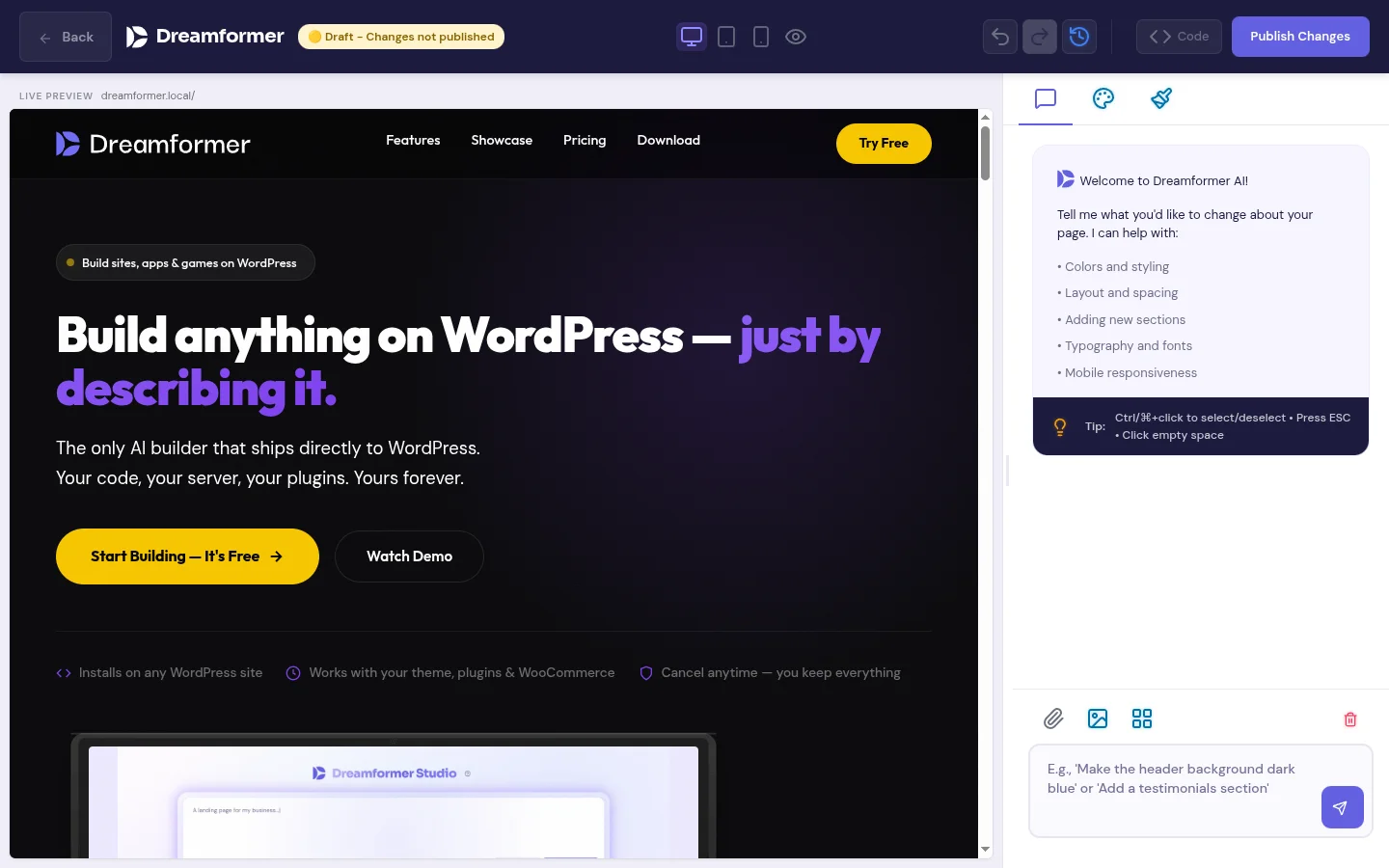
Dreamformer is a no-code AI website builder for WordPress. Describe what you want in plain English — get a fully functional site with custom HTML, CSS, and JavaScript. No drag-and-drop. No templates. Just tell the AI what to build.
Free plan available. No credit card required.
What is a no-code website builder?
A no-code website builder is any tool that lets you create a website without writing HTML, CSS, JavaScript, or any other programming language. Traditional no-code builders like Wix, Squarespace, and Framer use drag-and-drop interfaces — you move blocks around a canvas until the page looks right.
AI no-code builders work differently. Instead of dragging blocks, you describe what you want in plain English: “Create a landing page for my photography business with a portfolio grid, pricing section, and contact form.” The AI generates the entire page — structure, design, copy, and code — in one step. You edit by talking to it, not by clicking.
The result is the same: a professional website with zero coding. But the process is fundamentally different. Drag-and-drop builders require design decisions at every step (which font? what spacing? how wide?). AI builders make those decisions for you based on your description, then let you refine.
No-code AI builder vs. drag-and-drop vs. hiring a developer
| Factor | AI no-code (Dreamformer) | Drag-and-drop (Wix, Framer) | Hire a developer |
|---|---|---|---|
| Coding required | None | None | Developer handles it |
| Design skills needed | None — AI designs it | Some — you arrange blocks | None — designer handles it |
| Time to first page | 2–5 minutes | 2–8 hours | 1–4 weeks |
| Cost | $0–$29/month | $16–$45/month | $2,000–$10,000+ |
| Output quality | Clean HTML/CSS/JS | Platform-specific code | Custom code |
| Platform ownership | WordPress — you own it | Locked to platform | Depends on contract |
| SEO control | Full (WordPress + plugins) | Limited by platform | Full |
| Ongoing changes | Describe changes in chat | Manual drag-and-drop | Pay per change |
How the no-code AI builder works
Three steps. No design skills. No coding. No templates to customize.
Describe your site
Tell the AI what you need in plain English. Be as specific or as vague as you want — “create a landing page for my yoga studio with class schedule, pricing, and instructor bios” works just as well as “make me a business website.” The more detail you provide, the more tailored the result.
AI generates everything
Dreamformer builds your complete page: layout, typography, colors, sections, responsive design, and even placeholder copy tailored to your business. The output is real HTML, CSS, and JavaScript files — not a proprietary format locked to one platform.
Edit with conversation
Want to change the hero background? Swap the color palette? Add a testimonials section? Just tell the AI. Dreamformer’s visual editor lets you click any section and describe changes in natural language. No hunting through menus or style panels.
Why no-code matters for WordPress
WordPress powers 43% of the web, but it has always had a steep learning curve for non-technical users. Page builders like Elementor and Divi simplified things, but they still require understanding layout concepts, design principles, and the WordPress admin interface. They made WordPress accessible to people willing to learn — not to people who just want a website.
No-code AI changes this equation. Instead of learning WordPress, you describe what you want. Instead of choosing between 50 heading options, the AI picks the right one for your context. Instead of spending a weekend on your homepage, you spend 5 minutes describing it and 20 minutes refining it.
The key difference between Dreamformer and platforms like Wix or Squarespace is that your site runs on WordPress. That means you get the full WordPress ecosystem — 60,000+ plugins, complete SEO control, WooCommerce for e-commerce, and the ability to move your site to any host. You get the ease of no-code with the power of WordPress.
What you can build without code
Every type of site, from landing pages to full business websites.
Business landing pages
Hero sections, feature grids, testimonials, pricing tables, and contact forms. Describe your business and the AI builds a complete landing page with professional copy and responsive design. Ready to publish in minutes.
Portfolio sites
Showcase your work with gallery grids, project case studies, and bio sections. Designers, photographers, freelancers, and agencies can build a portfolio that looks custom-designed without touching CSS.
E-commerce pages
Product showcases, category pages, and promotional landing pages that integrate with WooCommerce. The AI generates the frontend; WordPress handles the checkout, inventory, and order management.
Service pages
Detailed service descriptions, process breakdowns, pricing tiers, and booking integrations. Professional services, agencies, consultants, and freelancers can present their offerings clearly without hiring a designer.
Team & about pages
Company stories, team member profiles, mission statements, and office galleries. Every business needs an about page — the AI generates one that matches your brand tone and includes all the sections visitors expect.
Event & launch pages
Countdown timers, speaker lineups, agenda sections, registration forms, and venue maps. Build a complete event page for conferences, product launches, or webinars. Publish fast, iterate faster.
Dreamformer vs. other no-code website builders
Most no-code builders fall into two categories: drag-and-drop platforms (Wix, Squarespace, Framer) and WordPress page builders (Elementor, Divi). Dreamformer is neither — it is an AI-native builder that generates code from natural language.
| Feature | Dreamformer | Framer | Wix | Elementor |
|---|---|---|---|---|
| Input method | Natural language | Drag-and-drop + AI assist | Drag-and-drop + AI assist | Drag-and-drop |
| Runs on WordPress | Yes — native plugin | No — proprietary | No — proprietary | Yes — plugin |
| Code output | Clean HTML/CSS/JS | Proprietary React | Proprietary format | Shortcodes + inline CSS |
| AI page generation | Full page from text | Section-level AI | Template + AI text | No AI generation |
| AI editing | Conversational editor | Limited AI assist | AI text only | Manual only |
| Theme generation | Full WordPress theme | N/A | N/A | No |
| Migration / portability | Standard WP export | Locked in | Locked in | WP-dependent |
| Starting price | Free (25 credits/mo) | Free (limited) | $17/month | Free (basic) |
What makes Dreamformer different
Not just another page builder. A fundamentally different way to create websites.
Natural language input
No menus, no panels, no block libraries. Describe what you want and the AI builds it. Edit by saying “make the hero bigger” or “add a testimonials section below pricing.” Your words are the interface.
Real code output
Every page is standard HTML, CSS, and JavaScript. No proprietary shortcodes, no framework lock-in, no bloated markup. The code is clean enough for a developer to hand-edit if you ever want to.
WordPress native
Dreamformer is a WordPress plugin, not a separate platform. Your sites live on WordPress, use WordPress themes, and have access to the entire plugin ecosystem. You never leave your WordPress dashboard.
Who should use a no-code AI website builder?
Small business owners who need a professional website but cannot justify $3,000–$10,000 for a web designer. Describe your business, get a complete site, and publish it today. A bakery, a law firm, a plumber, a yoga studio — the AI handles the design decisions you should not have to make.
Freelancers and solopreneurs who need a portfolio or service page but do not want to spend a weekend in a page builder. Your time is better spent on client work. Describe what you want, refine it in 20 minutes, and move on.
Startups that need to ship a landing page fast. Product-market fit does not wait for pixel-perfect design. Generate a professional landing page from a product description, A/B test different versions by generating variations, and iterate based on what converts.
Agencies that want to accelerate client delivery. Generate first-draft pages from client briefs in minutes instead of hours. Use the AI output as a starting point that designers refine, cutting project timelines significantly.
Non-technical founders who have an idea but not a technical co-founder. Instead of learning WordPress, hiring a developer, or settling for a cookie-cutter template, describe your vision and let AI build the first version. Get to market while the idea is fresh.
Example prompts that build real pages
See what happens when you describe a page to the AI.
“Create a landing page for a SaaS project management tool called TaskFlow. Include a hero with headline and demo CTA, feature grid with 6 features, pricing with 3 tiers, customer testimonials, and a final signup CTA. Modern, clean, dark theme.”
Generates: hero, features grid, pricing cards, testimonial carousel, CTA — fully responsive, dark-themed, with professional copy.
“Build a website for an Italian restaurant called Bella Cucina. Hero with a warm food photo area, our story section, menu highlights with prices, a reservation form, hours and location with a map placeholder, and photo gallery.”
Generates: atmospheric hero, story section, menu cards with pricing, reservation form, location info, gallery grid — warm color palette matching restaurant ambiance.
“Create a portfolio page for a freelance UI designer. Minimal layout, project grid with hover effects, an about section with skills list, client logos strip, and a contact form. Black and white with one accent color.”
Generates: minimal hero, filterable project grid, about + skills, client logo row, contact form — monochrome palette with accent color throughout.
“Design a product launch page for premium wireless headphones. Hero with product image area and key specs, feature breakdown with icons, comparison vs competitors table, customer reviews section, and buy now CTA with price.”
Generates: product hero with specs, icon feature grid, comparison table, review cards, sticky CTA — premium feel with clean product focus.
What no-code AI builders cannot do (yet)
AI website builders have real limitations. Being honest about them helps you decide if this approach works for your project.
Complex web applications. If you need a SaaS dashboard, a social network, or a real-time collaborative tool, you need custom development. No-code builders — whether AI or drag-and-drop — are for websites and content pages, not web applications with complex backend logic.
Pixel-perfect brand compliance. If your brand guidelines specify exact Pantone colors, 14.5px letter spacing on H2 elements, and a proprietary grid system, the AI will get you 90% there. The last 10% requires manual CSS refinement. For most businesses, the AI output is more than good enough. For Fortune 500 brand compliance, it is a starting point.
Dynamic data-driven pages. Pages that pull live data from APIs, update in real-time, or require database queries need custom development. The AI generates static pages and forms — if you need a booking system that checks availability in real-time, you will still need a developer or a specialized plugin.
The takeaway: No-code AI builders are ideal for marketing pages, business websites, portfolios, landing pages, and content sites. For anything that requires custom application logic, you still need developers — but the AI can build the marketing site around that application.
How to get started
From zero to a published website in three steps.
No-code website builder FAQ
Yes. AI-generated pages produce clean, responsive HTML/CSS that is indistinguishable from hand-coded sites. The output quality depends on how well you describe what you want — a detailed prompt produces a professional result. For most small businesses, the AI output exceeds what they would get from a budget freelancer.
Yes. Dreamformer is a standard WordPress plugin. Install it on any existing WordPress site regardless of host or theme. It generates pages alongside your existing content without affecting anything already on your site. You can use it to add new pages to a site built with any theme or page builder.
Yes. The HTML, CSS, and JavaScript files generated by Dreamformer are saved directly to your WordPress site. You own them completely. You can edit them, move them, export them, or hand them to a developer. There is no lock-in — if you stop using Dreamformer, your pages continue to work.
Wix ADI and Squarespace AI generate sites within their proprietary platforms — you cannot export the code or move to another host. Dreamformer generates standard code on WordPress, which you fully own and control. Dreamformer also generates entire pages from a single text prompt, while Wix and Squarespace AI features are more limited (text generation, section suggestions).
Since Dreamformer runs on WordPress, you have access to 60,000+ plugins for any functionality the AI does not cover. Need a booking system? Install a booking plugin. Need e-commerce? Add WooCommerce. Need forms with conditional logic? Use Gravity Forms. The AI builds your pages; WordPress plugins add the functionality.
Dreamformer has a free plan with 25 AI credits per month — enough to generate several pages and see if it works for you. Paid plans start at $19/month for more credits. Managed hosting (WordPress server + plugin included) starts at $29/month. No credit card required for the free plan.
Build your website without code. Describe it. AI builds it. You own it.
Stop learning tools. Start building your site.
Start Building FreeFree plan includes 25 credits. No credit card required.