AI code generation for WordPress: write custom site code in plain English.
Describe what you need — a booking form, a pricing calculator, a portfolio gallery — and Dreamformer generates the HTML, CSS, JavaScript, and PHP. Real code that runs on your WordPress site.
Free plan available. No credit card required.
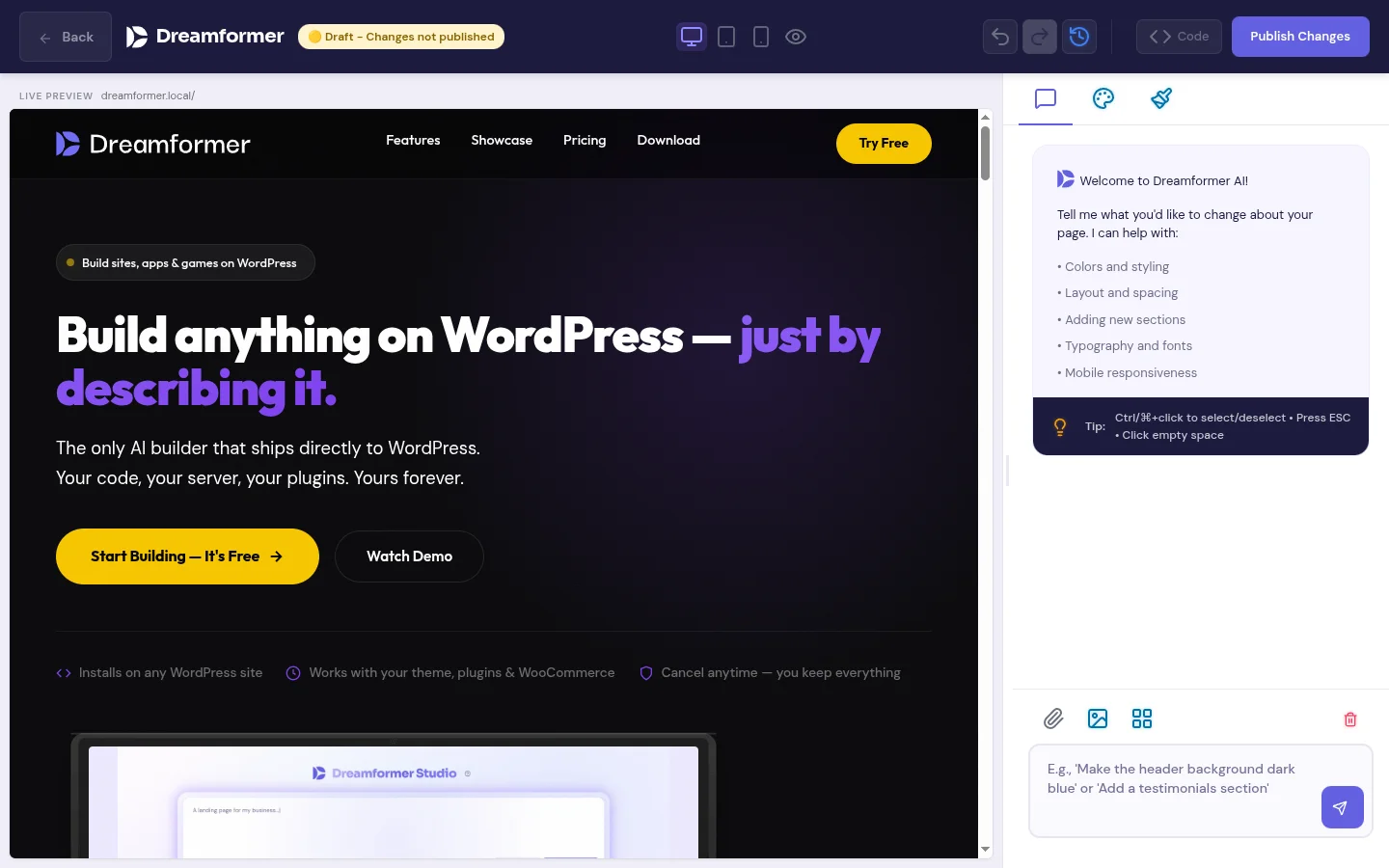
What is AI code generation and why does it matter for your website?
AI code generation means describing what you want a computer to build — in plain English — and getting working code back. Instead of writing HTML, CSS, JavaScript, or PHP by hand (or paying someone $50–$150/hour to do it), you type a sentence like “create a pricing page with three tiers and a feature comparison table” and the AI writes the code for you.
For most website owners, this changes the economics of building a site entirely. Custom functionality that used to require a developer — interactive forms, calculators, filterable portfolios, animated sections, WooCommerce customizations — becomes something you can describe and have built in minutes. No coding knowledge required. No waiting days for a freelancer to deliver.
For developers and agencies, AI code generation is a productivity multiplier. You skip the boilerplate, generate a working first draft in seconds, and spend your time refining instead of writing from scratch. The code is real and editable — it is not locked behind a proprietary drag-and-drop editor.
The key difference between AI code generation and traditional website builders (Elementor, Squarespace, Wix) is the output. Builders give you a visual interface that produces abstracted, platform-dependent markup. AI code generation gives you the actual code — HTML, CSS, JavaScript, PHP — that you own, can read, can modify, and can move anywhere.
How Dreamformer’s AI code generation works
Three steps. No terminal, no IDE, no coding experience needed.
Describe what you want
Open Dreamformer in your WordPress admin and type a description. “Create a mortgage calculator with monthly payment breakdown and amortization chart.” Be as specific or as vague as you want — the AI adapts.
AI generates the code
Dreamformer’s AI writes real HTML, CSS, and JavaScript (and PHP for theme edits). Not a template with your text swapped in — custom code generated specifically for your description. You can see the code, read it, and understand what it does.
Preview, refine, publish
See a live preview of the generated page. Want changes? Just describe them: “make the header larger” or “add a contact form at the bottom.” Each edit builds on the previous version. When you are happy, publish it to your live site with one click.
What types of code can Dreamformer generate?
Dreamformer generates code across the full WordPress stack. Here is what it can build.
Full HTML/CSS/JS pages
Landing pages, portfolios, about pages, contact pages, pricing pages — complete, responsive, production-ready. Each page gets its own HTML, CSS, and JavaScript files.
Interactive JavaScript
Calculators, booking forms, date pickers, image galleries, carousels, filterable grids, tab interfaces, accordions, interactive charts — any client-side functionality you can describe.
Theme PHP files
Edit your WordPress theme directly: header.php, footer.php, functions.php hooks, custom page templates, and WooCommerce template overrides. The AI writes real PHP that integrates with WordPress core.
WooCommerce customizations
Custom product page layouts, checkout modifications, template overrides, custom tabs, price display tweaks, and shop page redesigns. All through the theme editor with real PHP output.
Web applications and games
Dreamformer can generate full interactive applications: browser-based games, dashboards, data visualization tools, project management boards, quiz builders — anything that runs in a browser.
Custom layouts and sections
Hero sections, testimonial carousels, team grids, FAQ accordions, feature showcases, comparison tables, CTAs — individual sections you can add to any page on your site.
AI code generation vs. hiring a developer vs. other AI tools
| Factor | Dreamformer | Freelance developer | GitHub Copilot / ChatGPT |
|---|---|---|---|
| Coding required | No | No (you hire someone) | Yes |
| Output | Complete page/feature | Complete page/feature | Code snippets |
| WordPress integration | Built-in | Manual | None |
| Time to result | Minutes | Days to weeks | Hours (with coding) |
| Cost | A few credits per task | $500–$5,000+ | $10–$20/mo + your time |
| Iteration speed | Instant edits | Back-and-forth emails | Fast (if you code) |
| Live preview | Yes | Staging site | Manual setup |
| Code ownership | You own everything | You own everything | You own everything |
| Best for | Non-technical users + fast prototyping | Complex custom projects | Developers writing code |
The honest take: If you need complex backend logic, third-party API integrations, or a custom WordPress plugin built from scratch, a developer is still the right choice. If you need code assistance while writing in an IDE, Copilot and Cursor are excellent tools.
Dreamformer fills the gap between “I need custom functionality on my WordPress site” and “I do not want to write code or hire a developer.” It generates complete, working pages and features from a text description, deployed directly to your WordPress site. For the 90% of website work that is frontend pages, interactive elements, and theme customizations, AI code generation eliminates the need for a developer entirely.
Real-world examples: what you can build without coding
Each example below was generated by describing what we wanted in plain English. No code was written manually.
AI code generation for agencies
Client says “I want a landing page for our spring sale with a countdown timer, product grid, and email signup.” You used to spend a day building that. With Dreamformer, you type the description, generate the page, make a few refinements, and send a preview link — all within the client meeting.
The economics shift when AI handles the first draft. You can take on more projects, deliver faster, and spend your developer hours on the custom work that actually requires human judgment. Dreamformer generates the 80% that is standard; your team handles the 20% that is not.
AI code generation for developers
You know how to write HTML, CSS, and PHP. You do not need AI to replace you — you need it to skip the boilerplate. Describe a component, get a working implementation, then customize the code directly. The output is clean, readable, standard WordPress code — not obfuscated framework output.
Dreamformer is especially useful for WordPress theme work. Instead of manually creating template files and writing PHP hooks, describe the template behavior you want and let the AI generate the code. Then review it, adjust it, and commit it. Think of it as an AI pair programmer that lives inside WordPress.
Frequently asked questions about AI code generation
The AI generates clean, semantic HTML with well-structured CSS and vanilla JavaScript. For theme edits, it writes standard WordPress PHP using core APIs and hooks. The code is readable, commented where necessary, and follows WordPress coding conventions. It is not minified or obfuscated — you can open the files and read every line. That said, for mission-critical or security-sensitive functionality (payment processing, authentication), you should always have a developer review the output.
Yes. AI-generated pages are stored as standard HTML, CSS, and JavaScript files in your WordPress uploads directory. Theme edits modify actual theme PHP files. You can open any of these files in a code editor and modify them directly. You can also use Dreamformer’s AI to make further changes by describing what you want — the two approaches work together.
Yes — through the theme editor. Dreamformer can edit your active WordPress theme’s PHP files: header.php, footer.php, functions.php, custom page templates, and WooCommerce template overrides. It writes real PHP that uses WordPress core functions, action hooks, and filter hooks. It does not generate an entire new theme from scratch, but it can extensively modify and extend your existing theme.
Dreamformer uses Claude by Anthropic — a state-of-the-art AI model known for strong code generation capabilities. The model is specifically prompted and optimized for WordPress development, so it understands WordPress conventions, PHP functions, template hierarchy, and WooCommerce APIs. The model is regularly updated as newer versions become available.
ChatGPT gives you code snippets in a chat window. You then have to copy, paste, create files, integrate them into your site, debug issues, and deploy manually. Dreamformer generates complete, working pages deployed directly to your WordPress site. There is no copy-pasting, no file management, no deployment step. You describe what you want, the AI builds it, and it is live on your site. It is the difference between a recipe and a cooked meal.
AI-generated pages are self-contained — each page has its own HTML, CSS, and JavaScript files that do not interfere with the rest of your site. Theme edits are more impactful since they modify shared template files, but Dreamformer creates backups before making changes so you can revert if needed. As with any code change, we recommend testing on a staging site for critical production environments.
Dreamformer uses a credit system based on actual AI token usage — you pay for what you use, not a flat rate per page. Simple edits cost fewer credits than complex full-page generations. The free plan includes 25 credits to start. Paid plans start at $19/month for the plugin only (100 credits), or $29/month for hosting + plugin with 100 credits per month. Compared to developer rates of $50–$150/hour, AI code generation costs a fraction.
Generate custom code for your WordPress site. In minutes, not months.
Describe what you need in plain English. Get real HTML, CSS, JavaScript, and PHP back.
Try Dreamformer FreeFree plan includes 25 credits. No credit card required.