The WordPress AI plugin that builds anything you describe.
Dreamformer is a fullstack AI builder that lives inside your WordPress admin. Describe any page, app, tool, or layout in plain English and it generates production-ready code. It also edits your existing WordPress theme — PHP templates, CSS, functions.php, WooCommerce overrides, all of it — through natural language.
No credit card required. 25 free credits. You keep everything you build.
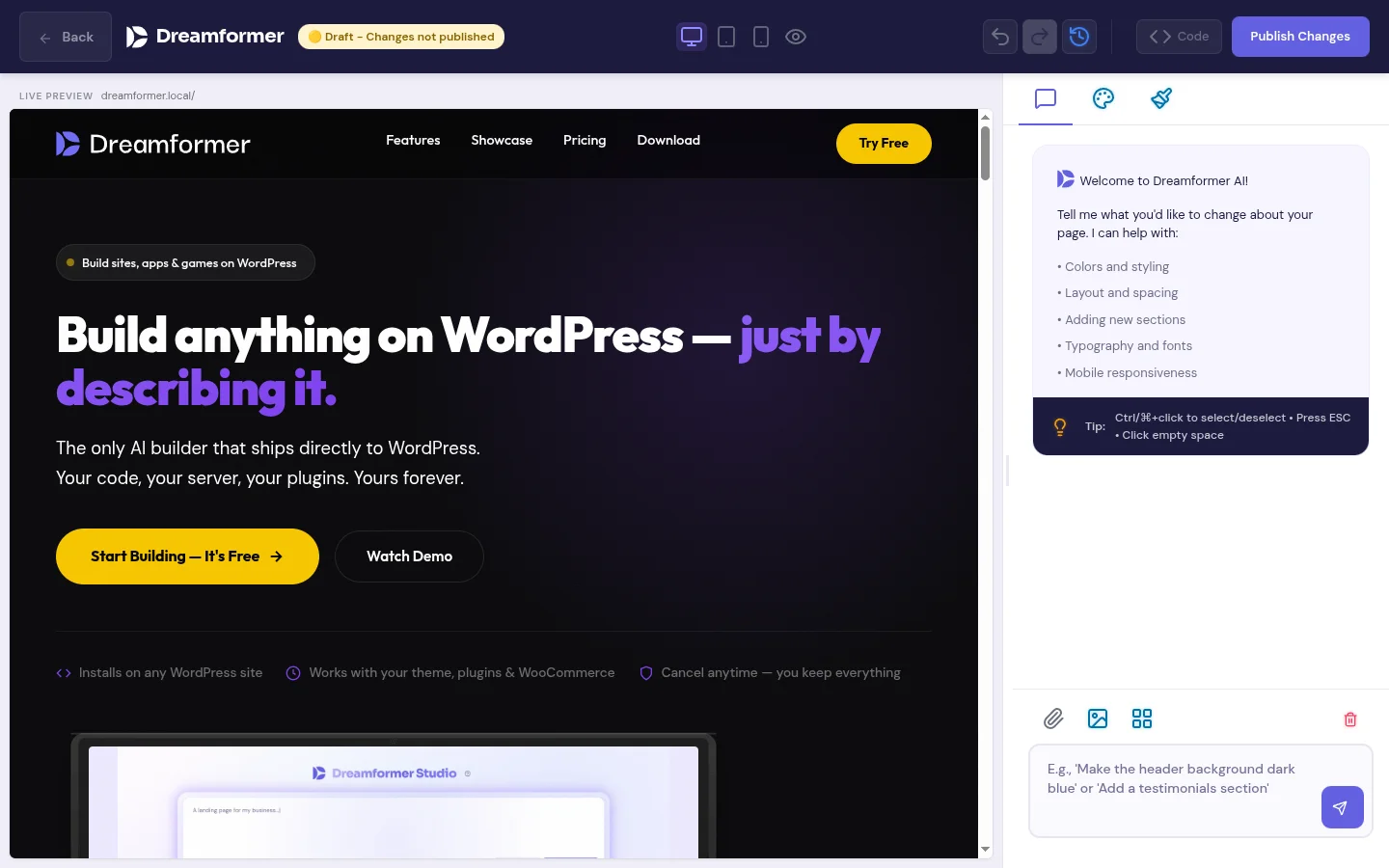
What does the Dreamformer WordPress plugin do?
Dreamformer adds an AI prompt interface directly inside your WordPress admin dashboard. You type a description of what you want — a landing page, a web app, an interactive calculator, a portfolio, a game, a custom dashboard — and the AI generates complete, production-ready code for it.
The plugin does two distinct things:
1. Builds new pages and applications. Describe anything and Dreamformer generates the HTML, CSS, and JavaScript from scratch. These are not shortcodes or block templates — they are standalone files that live on your server. Landing pages, pricing tables, interactive tools, browser-based games, data dashboards, client portals, custom post type interfaces, anything that runs in a browser. You can then refine the output with follow-up prompts: “make the hero section taller,” “add a dark mode toggle,” “change the color scheme to blue.”
2. Edits your existing WordPress theme. Dreamformer has a visual theme editor that lets you modify your active theme through natural language. It writes real PHP — template files, functions.php hooks, WooCommerce template overrides, custom page templates, widget areas, navigation menus. It also handles CSS, JavaScript, and layout structure. Describe the change you want and the AI modifies the actual theme files. This works with any WordPress theme.
Everything Dreamformer generates is real code that lives on your server. You own it completely. You can open it in VS Code, version-control it with Git, or hand it to a developer to extend. If you deactivate the plugin, your generated pages and theme edits stay exactly as they are.
Who is this plugin for?
Three groups get the most value from Dreamformer.
WordPress site owners who want a redesign
You have an existing WordPress site and want to refresh the design, add new pages, or build something custom — without hiring a developer or learning a page builder. Describe what you want in plain English and Dreamformer builds it. You can iterate until it looks right.
Agencies managing multiple client sites
You build websites for clients and need to move faster. Use Dreamformer to generate first drafts of client pages, prototype layouts during discovery calls, or build one-off tools that would take hours to code by hand. Each generation takes about 30 seconds instead of days.
Developers who want to move faster
You know HTML, CSS, and JavaScript but want AI to handle the tedious parts — initial scaffolding, responsive layouts, boilerplate components. Generate the starting point with Dreamformer, then fine-tune the code by hand. It is a development accelerator, not a replacement.
How to use the Dreamformer WordPress plugin — step by step
From install to finished page in under five minutes.
Install and activate
Search for “Dreamformer” in the WordPress plugin directory, or upload the zip file. Activate it and you will see a new “Dreamformer” menu item in your WordPress admin sidebar. No API keys to configure, no external accounts to create — you get 25 free credits immediately.
Describe what you want
Type a description of the page or application you want to build. Be as specific or as vague as you like — “create a landing page for a yoga studio with class schedule, pricing, and testimonials” or just “portfolio page.” You can also attach reference images or style screenshots for the AI to match.
Review, refine, publish
Dreamformer generates the complete page with HTML, CSS, and JavaScript in about 30 seconds. Preview it live, then iterate with follow-up prompts: “make the header sticky,” “add a contact form,” “change the font to Inter.” When it looks right, publish it to your WordPress site with one click.
What the AI actually generates
Real code, real files, on your server. Here is exactly what Dreamformer produces.
Full pages (HTML/CSS/JS)
Landing pages, about pages, pricing pages, portfolios, contact pages — any standard website page. Generated as clean, semantic HTML with responsive CSS and interactive JavaScript. Production-ready with proper accessibility attributes.
Web applications
Interactive tools, calculators, dashboards, booking interfaces, client portals, data visualizations — anything that runs in the browser. Dreamformer generates the full frontend stack with working JavaScript logic, not just static layouts.
Theme edits (PHP, CSS, JS)
Modify your existing WordPress theme through natural language. The AI writes real PHP — template files, functions.php hooks, WooCommerce template overrides, custom page templates. It also handles CSS and JavaScript. Describe what you want changed and it edits the actual theme files on your server.
Games, tools, and experiments
Browser-based games, interactive quizzes, ROI calculators, animation demos, custom post type interfaces. If it can be built with HTML, CSS, and JavaScript, Dreamformer can generate it. Some users have built things we never anticipated.
One clarification: Dreamformer does not generate a complete WordPress theme from scratch (a new theme with its own directory, screenshot, and full template hierarchy). What it does is edit the theme you already have installed — modifying and adding PHP templates, functions.php hooks, WooCommerce overrides, and anything else in your active theme. The page builder side generates standalone HTML/CSS/JS pages. The theme editor side writes PHP. Together, they cover frontend and backend.
Dreamformer vs. other WordPress AI plugins
| Capability | Dreamformer | Elementor AI | Divi AI | 10Web AI |
|---|---|---|---|---|
| Full pages from a text description | Yes | Sections only | Sections only | Yes |
| Web apps and interactive tools | Yes | No | No | No |
| AI theme editing | Yes | No | No | No |
| Visual editor with AI | Yes | Yes | Yes | Limited |
| Code works without plugin installed | Yes | No | No | No |
| Generates clean HTML/CSS/JS | Yes | Proprietary markup | Proprietary markup | Partially |
| AI copy and image generation | Copy only | Both | Both | Both |
| Free tier | 25 credits/mo | Pro only ($12/mo) | Pro only ($25/mo) | Trial only |
The honest take: Elementor AI and Divi AI are good at what they do — helping you build content within their respective page builders. They have mature ecosystems with huge template libraries and drag-and-drop editors. Dreamformer takes a fundamentally different approach: instead of arranging pre-built widgets, it writes actual code from scratch. This means more creative freedom and no vendor lock-in, but it also means you are working with raw code output that sometimes needs manual refinement. Pick the approach that matches how you like to work.
Plugin features at a glance
Everything included in the Dreamformer WordPress plugin.
Natural language prompt
Describe what you want in plain English. No coding knowledge required. The AI interprets your description and generates the appropriate code, layout, and styling.
Visual AI theme editor
A side-by-side editor that shows your live theme on the left and an AI chat on the right. Describe changes and the AI writes the PHP, CSS, and JavaScript to make it happen. Works with any WordPress theme.
Image and style references
Attach screenshots or reference images to your prompt. The AI analyzes the visual style and generates code that matches the look you are going for — colors, spacing, layout patterns.
Iterative refinement
Do not like something? Describe the change: “make the button larger,” “swap the two-column layout for a single column,” “add a testimonial section.” Each edit builds on the previous version.
No vendor lock-in
Generated pages are standalone HTML/CSS/JS files. Theme edits modify your actual theme files. If you uninstall Dreamformer, everything you built stays. You own the code.
Works on any WordPress host
SiteGround, Cloudways, WP Engine, Bluehost, your own VPS, or Dreamformer’s own managed hosting. No special server requirements — if it runs WordPress, Dreamformer works on it.
Works with your existing WordPress setup
Dreamformer does not replace your existing tools. It adds an AI layer on top of whatever you are already using. Your theme, your plugins, your hosting, your workflow — all unchanged.
The pages Dreamformer generates are stored as WordPress pages with their own HTML, CSS, and JavaScript files. They coexist with your existing content. Your SEO plugin (Yoast, Rank Math, All in One SEO) indexes them normally. Your caching plugin (WP Rocket, W3 Total Cache, LiteSpeed) caches them like any other page. Your security plugin (Wordfence, Sucuri) monitors them like everything else.
The theme editor works with any active WordPress theme — commercial themes like Astra, GeneratePress, and Kadence, or custom themes built by your developer. Dreamformer edits the actual PHP, CSS, and JavaScript files in your theme directory, so the changes persist even if you deactivate the plugin.
Frequently asked questions about the Dreamformer WordPress plugin
Yes — through the theme editor. When you edit your existing WordPress theme with Dreamformer, the AI writes real PHP: template files, functions.php hooks, WooCommerce template overrides, custom page templates, widget areas, and navigation menus. It modifies the actual PHP files in your active theme. The page builder side generates standalone pages as HTML, CSS, and JavaScript. What Dreamformer does not do is create a brand new theme from scratch — it works with the theme you already have installed.
They solve the same problem differently. Elementor and Divi are drag-and-drop visual builders where you arrange pre-built widgets on a canvas. They store content in their own format — your pages depend on the plugin to render. Dreamformer generates standalone code from a text description. Some users replace their page builder entirely with Dreamformer; others use both. If you prefer visual drag-and-drop, stick with Elementor or Divi. If you prefer describing what you want and getting clean code, Dreamformer is worth trying.
Yes. All generated code lives on your server as standard .html, .css, and .js files. You can open them in any code editor (VS Code, Sublime Text, PhpStorm) and make manual changes. You can also use Dreamformer’s AI editor to iterate — describe the change you want and it modifies the existing code. Version it with Git, hand it to a developer, or edit it yourself. The code is yours.
Yes. The theme editor can generate WooCommerce template overrides (single-product.php, archive-product.php, cart, checkout), custom shop page layouts, and WooCommerce-specific functions.php hooks. It edits your active theme, and WooCommerce template overrides live in the theme — so it handles them naturally. On the page builder side, you can also generate standalone product-focused landing pages, promotional pages, and other marketing content as HTML/CSS/JS.
The free plan includes 25 credits per month. Credits are based on actual AI token usage — simple edits use fewer credits than complex full-page generations. If you need more, paid plans start at $19/month for 100 credits. There is no feature gating — free users get access to everything, just with fewer credits. See the pricing page for the full breakdown.
No. AI-generated code varies in quality depending on the complexity of what you ask for. Simple pages (landing pages, portfolios, about pages) usually come out great on the first try. Complex applications and highly specific designs sometimes need a few rounds of iteration. Think of it as a very fast first draft — usually 80-90% of the way there, with refinement needed for the last mile. The iterative AI editor makes it easy to close that gap.
Try the free WordPress AI plugin. Build something in 30 seconds.
25 free credits per month. Describe a page, get production-ready code. No credit card, no lock-in.
Install Free PluginWorks on any self-hosted WordPress site. PHP 7.4+.